We built Assistly because we kept running into two frustrating problems with AI assistants during meetings:
First, nobody wants an awkward AI bot joining their call or sending sensitive conversations to another participant. Second, when something important comes up, you often have to stop the conversation, dig through notes or documents, and switch between different AI tools to get the context you need.
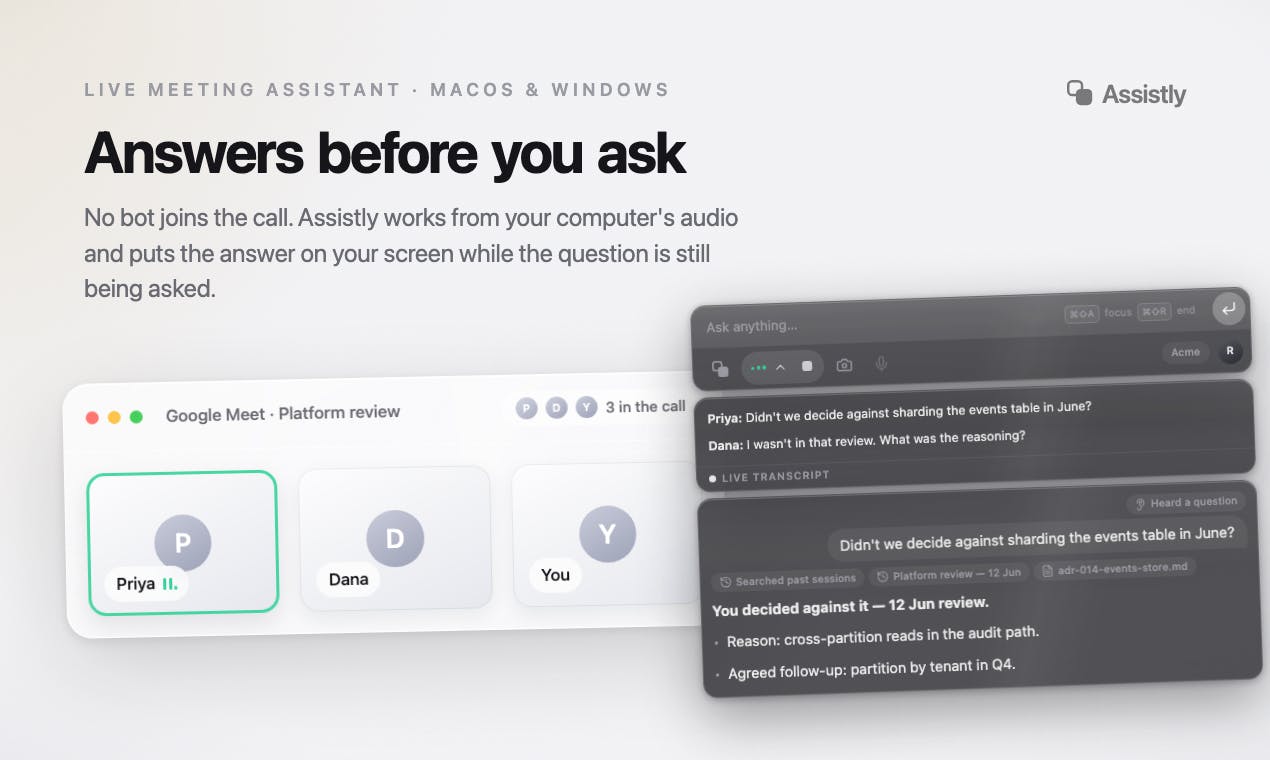
Assistly is built to help in that moment — and keep that context useful after the meeting:No Meeting Bots 🤖: Assistly captures system audio locally, so there’s no AI bot joining your Zoom, Google Meet, or Teams call.Real-Time Assistance ⚡: Assistly detects questions and important moments as they happen and surfaces relevant context and assistance on your screen, so you can stay focused on the conversation.Private Overlay ✨: Your Assistly workspace stays on your screen without appearing in screen shares and recordings.MCP, Both Ways 🧠: Assistly can connect to other MCP tools to pull in relevant sources and context while you work. And after your meetings, your existing AI tools can connect to Assistly through MCP to query your meetings and bring that context into your everyday workflows.The idea is simple: Assistly understands your conversations in real time, brings in context when you need it, and makes your meeting knowledge available to the AI tools you already use.
👉 Get started for free: https://tryassistly.com/
Give Assistly a try on macOS or Windows and let us know what you think. We'd love to hear your feedback and see how you use it. 🚀
PH 用户
@khizeryounas nice, this is genuinely a way to solve the bot in meeting problem, I don't think this can be blocked
PH 用户
the no-bot angle is smart, most meeting assistants get blocked or flagged specifically because of the visible participant. one thing I'm not clear on though: since it's transcribing system audio locally without a bot joining, how does consent work for the other people on the call? some places require all-party consent to record a conversation even if nothing shows up as a visible participant, and "no bot" might make people assume nothing is being captured when something actually is.
We built Assistly because we kept running into two frustrating problems with AI assistants during meetings:
First, nobody wants an awkward AI bot joining their call or sending sensitive conversations to another participant. Second, when something important comes up, you often have to stop the conversation, dig through notes or documents, and switch between different AI tools to get the context you need.
Assistly is built to help in that moment — and keep that context useful after the meeting:No Meeting Bots 🤖: Assistly captures system audio locally, so there’s no AI bot joining your Zoom, Google Meet, or Teams call.Real-Time Assistance ⚡: Assistly detects questions and important moments as they happen and surfaces relevant context and assistance on your screen, so you can stay focused on the conversation.Private Overlay ✨: Your Assistly workspace stays on your screen without appearing in screen shares and recordings.MCP, Both Ways 🧠: Assistly can connect to other MCP tools to pull in relevant sources and context while you work. And after your meetings, your existing AI tools can connect to Assistly through MCP to query your meetings and bring that context into your everyday workflows.The idea is simple: Assistly understands your conversations in real time, brings in context when you need it, and makes your meeting knowledge available to the AI tools you already use.
👉 Get started for free: https://tryassistly.com/
Give Assistly a try on macOS or Windows and let us know what you think. We'd love to hear your feedback and see how you use it. 🚀