通过 remote-debugging-port 启动 ChatGPT App,用 DevTools 调试其 UI
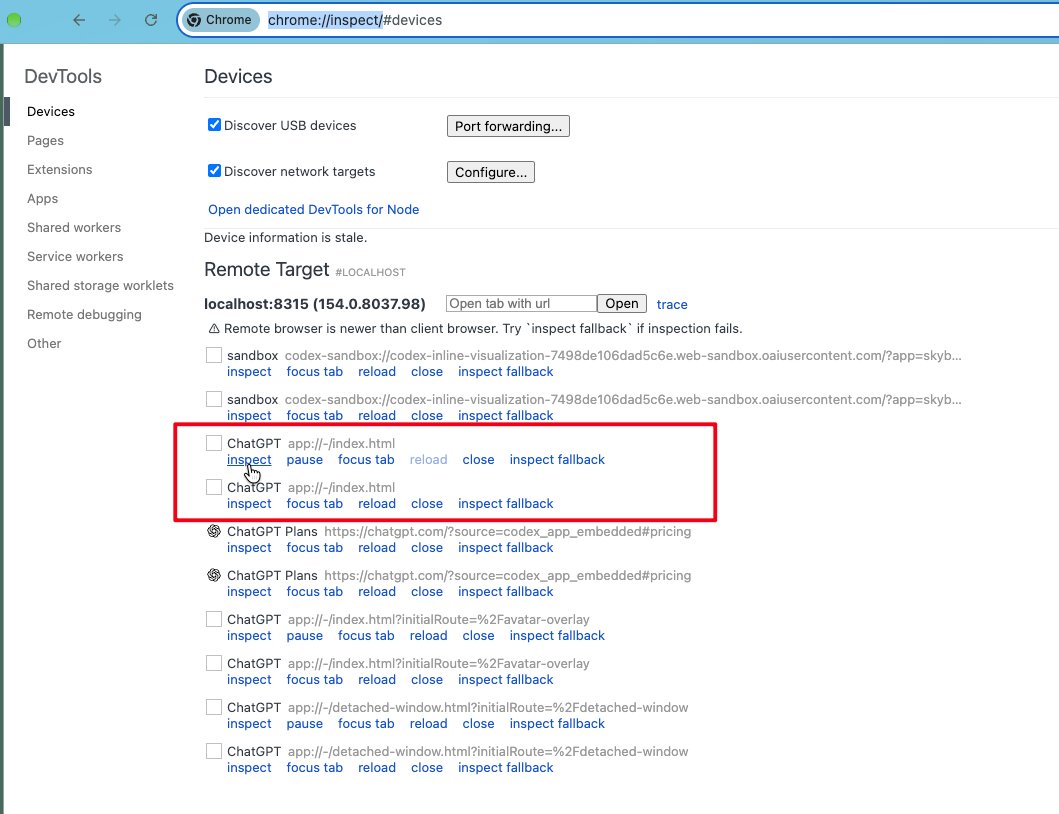
如果你想 Debug Codex/ChatGPT 的 Mac App 的 UI 实现
1. 退出正在运行的 Codex App
2. 命令行窗口执行:
$ open /Applications/ChatGPT.app --args --remote-debugging-port=8315 --remote-allow-origins=http://localhost:8315
2. Chrome 里面输入 chrome://inspect/ 打开 Remote Target
3. 从列表中找到 ChatGPT
app://-/index.html,点击 inspect
4. 就会弹出 DevTools 窗口看到 Codex UI,像 Debug 普通网页一样 Debug Codex 了
1. 退出正在运行的 Codex App
2. 命令行窗口执行:
$ open /Applications/ChatGPT.app --args --remote-debugging-port=8315 --remote-allow-origins=http://localhost:8315
2. Chrome 里面输入 chrome://inspect/ 打开 Remote Target
3. 从列表中找到 ChatGPT
app://-/index.html,点击 inspect
4. 就会弹出 DevTools 窗口看到 Codex UI,像 Debug 普通网页一样 Debug Codex 了