Codex App 中 /goal 功能的使用步骤
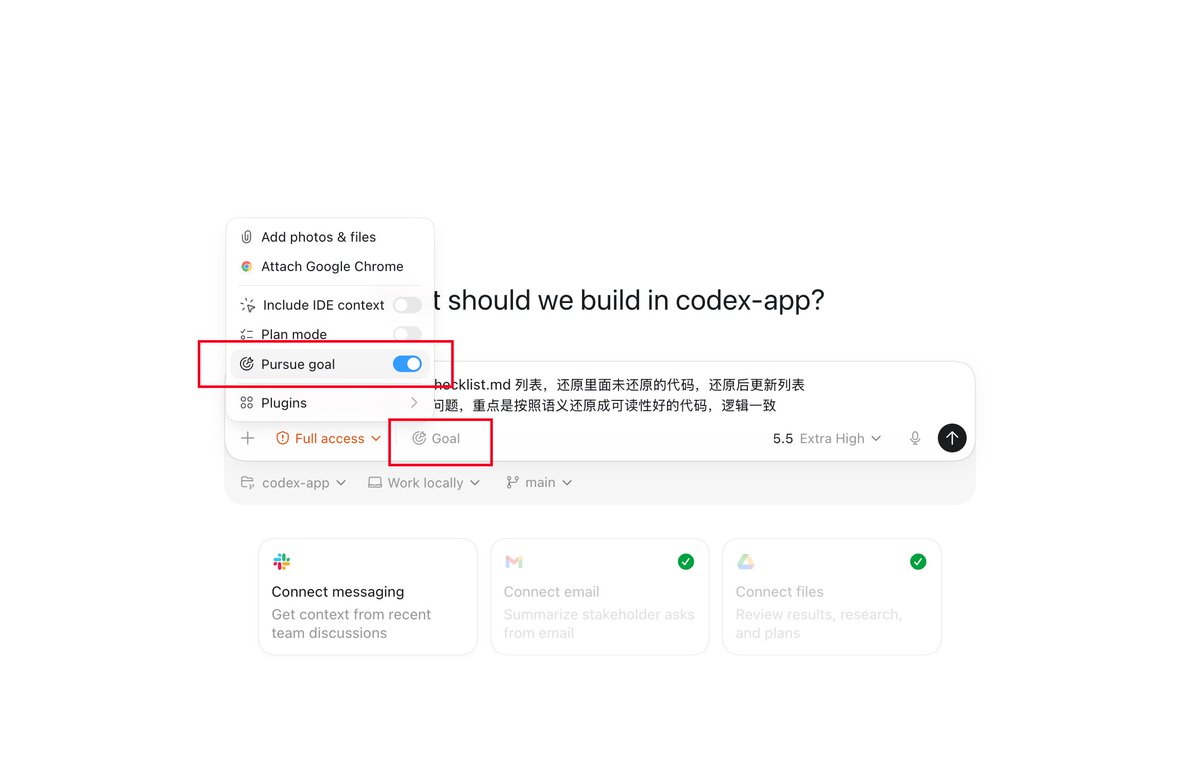
如何在 Codex App 使用 /goal 的简单说明:
1. 升级 Codex App 到最新版本
2. 先在命令行运行一下下面的指令:
> codex features enable goals
或者手动修改 ~/.codex/config.toml
[features]
goals = true
3. 开头输入 /goal,或者点 + 弹出菜单中选择
4. 开始后,输入框上方可以暂停、编辑、删除
1. 升级 Codex App 到最新版本
2. 先在命令行运行一下下面的指令:
> codex features enable goals
或者手动修改 ~/.codex/config.toml
[features]
goals = true
3. 开头输入 /goal,或者点 + 弹出菜单中选择
4. 开始后,输入框上方可以暂停、编辑、删除
🥅
/goal has graduated from an experiment—for tasks big and small, Codex gets your work done.
Use goal mode in the Codex app, IDE Extension, or CLI to give Codex a specific milestone, and it will keep working until it gets there, even across hours or days.
You can check in and https://t.co/KroSAScGGa