I'm Brjan — solo founder shipping in public from Ho Chi Minh City 🇻🇳.
The honest reason I built Screenify Studio: my demos kept looking like shit. I'd spend weeks building features, then watch people barely notice them because my demo videos hid everything behind flat, static recordings.
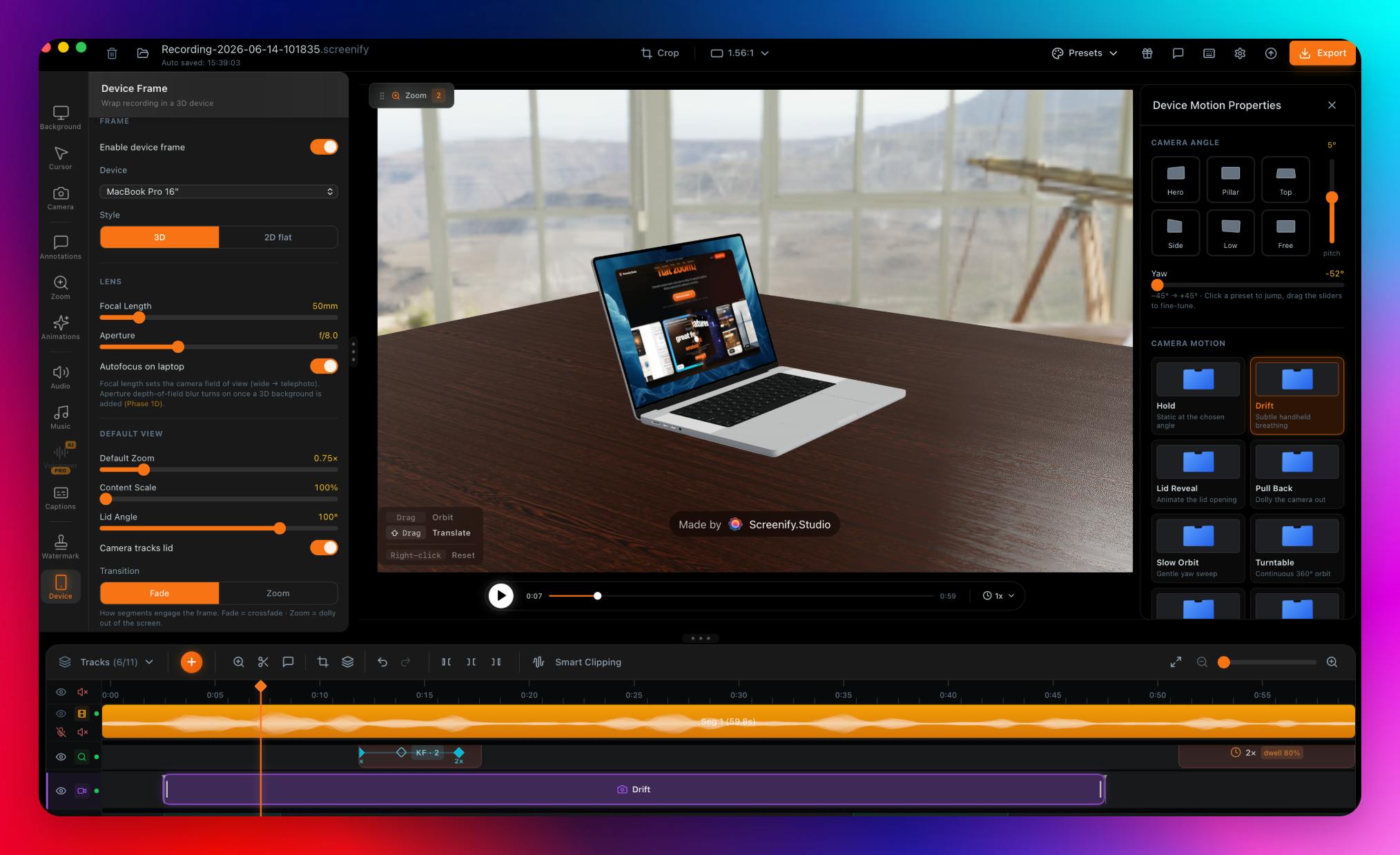
So I built the tool I wanted. Record on your Mac, drop it into a photoreal 3D MacBook, iPhone, or iPad — or stage multiple devices together in one cinematic ecosystem shot — pick a cinematic camera motion, and ship a finished MP4. Or point it at any URL and let an AI drive a real browser to record the whole demo for you, then add the cinematic touches (3D moves, spotlights, callouts).
Prefer full control? There's a deep editor with manual zoom keyframes. Live in the terminal? Screenify now speaks MCP — connect it once and Claude, Claude Code, or Cursor can record, style, and hand you the finished video — plus a JSON-speaking CLI if you'd rather script it yourself.
Everything runs on-device on Apple Silicon — nothing uploaded. Free to start; you only upgrade when you genuinely need higher-quality exports and the more advanced features.
Would love your feedback — what do you use for product demos today? Happy to nerd out about the 3D pipeline, the MCP server, or the AI web-record under the hood.
PH 用户
What kills demo videos for the Mac apps I work on is that every UI change makes last month's recording wrong, so anything that re-records from a script is worth real money to me. Your AI drives a real browser, but can it drive a native Mac app window too, or is that the manual editor path only?
PH 用户
This is great. We actually use Clueso right now for recording, but there's still a bit of editing involved. Plus, it's too expensive. I'll check it out!
PH 用户
solo founder shipping this in public is a nice touch, the honesty about "demos kept looking like shit" is relatable. question on the web-driving side - a lot of real product demos start behind a login wall, sometimes with 2FA. does the agent handle authenticating into the app itself, or do you need to get it past login manually and then hand off control once you're in the actual product?
I'm Brjan — solo founder shipping in public from Ho Chi Minh City 🇻🇳.
The honest reason I built Screenify Studio: my demos kept looking like shit. I'd spend weeks building features, then watch people barely notice them because my demo videos hid everything behind flat, static recordings.
So I built the tool I wanted. Record on your Mac, drop it into a photoreal 3D MacBook, iPhone, or iPad — or stage multiple devices together in one cinematic ecosystem shot — pick a cinematic camera motion, and ship a finished MP4. Or point it at any URL and let an AI drive a real browser to record the whole demo for you, then add the cinematic touches (3D moves, spotlights, callouts).
Prefer full control? There's a deep editor with manual zoom keyframes. Live in the terminal? Screenify now speaks MCP — connect it once and Claude, Claude Code, or Cursor can record, style, and hand you the finished video — plus a JSON-speaking CLI if you'd rather script it yourself.
Everything runs on-device on Apple Silicon — nothing uploaded. Free to start; you only upgrade when you genuinely need higher-quality exports and the more advanced features.
Would love your feedback — what do you use for product demos today? Happy to nerd out about the 3D pipeline, the MCP server, or the AI web-record under the hood.