BitNet
微软官方开源的 1-bit(1.58-bit)LLM 推理框架,基于 llama.cpp 和 T-MAC 查表内核,在 CPU/GPU 上做三元权重的无损推理。x86 CPU 上比全精度快 2.37–6.17 倍、能耗降约 72%–82%,单颗 CPU 即可跑 100B 模型,配合官方 BitNet-b1.58-2B-4T 和 0.6B/270M embedding 模型,适合端侧与边缘部署。MIT 许可。
README
bitnet.cpp






📰 新闻
07/23/2026: 📣 我们发布了 VibeASR.cpp —— 一个基于 BitNet I2_S 量化的 CPU 实时多语言 ASR(自动语音识别)推理引擎,在 x86(AVX2)和 ARM(NEON)平台上仅需极少线程数即可实现 RTF < 1。[代码] [模型] [报告] 
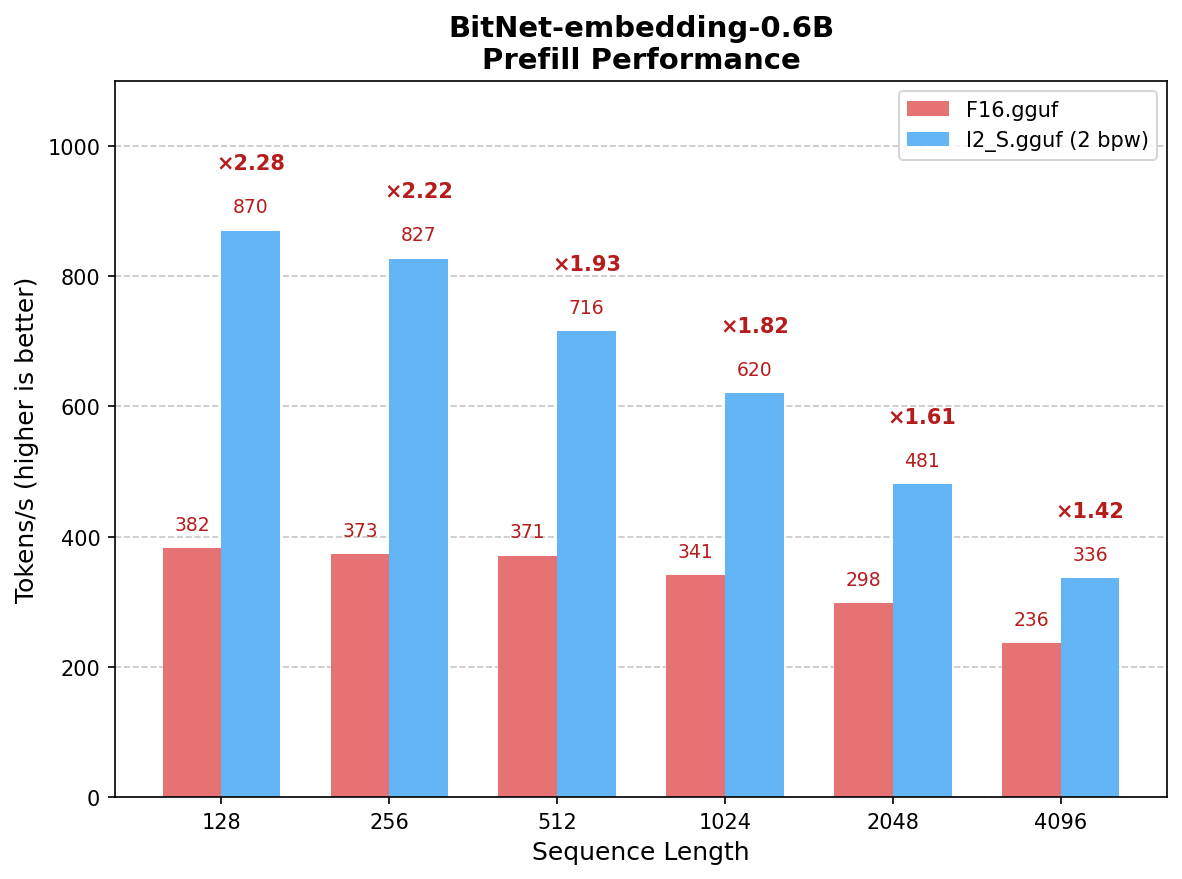
07/20/2026: 📣 我们在 Hugging Face 上发布了 BitNet-embedding-0.6B 和 BitNet-embedding-270M —— 首批 1-bit embedding(嵌入)模型,在 CPU 上提供具有竞争力的 embedding 质量以及显著更快的推理速度。
- 在 BitNet-embedding-0.6B prefill(预填充)阶段相比 F16 实现 1.42x 至 2.28x 加速(8 线程)
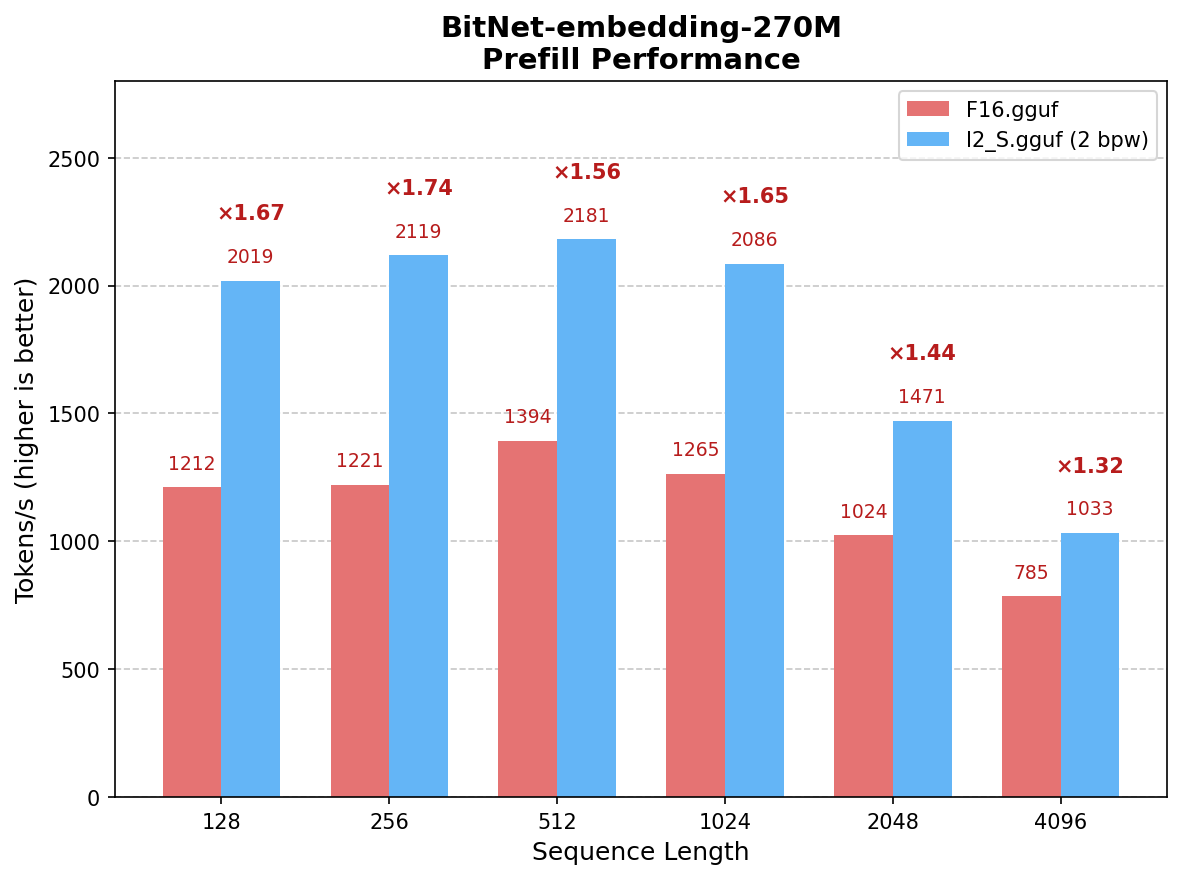
- 在 BitNet-embedding-270M prefill 阶段相比 F16 实现 1.32x 至 1.74x 加速(8 线程)
- 在 x86 CPU 上支持使用优化 kernel 的 I2_S 转换
- 每个权重仅占 2 bit 的无损推理
07/16/2026: 📣 发布了 BitNet Embeddings 0.6B/270M: I2_S 转换与推理优化 —— 使用优化 I2_S kernel 转换和运行 BitNet embedding 模型的详细指南。
01/15/2026: 📣 发布了 BitNet CPU 推理优化 —— 并行 kernel 实现,支持可配置的 tiling(分块)和 embedding 量化,相比原始实现额外实现 1.15x 至 2.1x 的加速。
05/20/2025: 📣 发布了 BitNet 官方 GPU 推理 kernel —— 将 1-bit 推理扩展到 CPU 之外。
04/14/2025: 📣 在 Hugging Face 上发布了 BitNet 官方 2B 参数模型 —— 首个使用 4T tokens 训练的官方 BitNet b1.58 模型。
02/18/2025: 📑 Bitnet.cpp: Efficient Edge Inference for Ternary LLMs —— 关于 bitnet.cpp 架构与设计的系统级论文。
11/08/2024: 📑 BitNet a4.8: 面向 1-bit LLM 的 4-bit 激活 —— 启用 4-bit 激活以进一步提升效率。
10/21/2024: 📑 1-bit AI Infra: Part 1.1, Fast and Lossless BitNet b1.58 Inference on CPUs —— bitnet.cpp 背后的技术报告。
10/17/2024: 📣 bitnet.cpp 1.0 发布。
03/21/2024: 📑 The-Era-of-1-bit-LLMs: Training Tips, Code, FAQ
02/27/2024: 📑 The Era of 1-bit LLMs: All Large Language Models are in 1.58 Bits —— 引入 BitNet b1.58 的基础性论文。
10/17/2023: 📑 BitNet: Scaling 1-bit Transformers for Large Language Models —— 最初的 BitNet 论文。
概述
bitnet.cpp 是面向 1-bit LLM(例如 BitNet b1.58)的官方推理框架。它提供了一套优化的 kernel,支持在 CPU 和 GPU 上对 1.58-bit 模型进行快速且无损的推理(NPU 支持即将推出)。
你可以通过这个在线 demo试用,或者在自己的 CPU 或 GPU 上构建并运行。
bitnet.cpp 在 ARM CPU 上实现了 1.37x 至 5.07x 的加速,模型越大性能提升越显著。此外,它还能将能耗降低 55.4% 至 70.0%,进一步提升整体效率。在 x86 CPU 上,加速比范围为 2.37x 至 6.17x,能耗降低幅度为 71.9% 至 82.2%。此外,bitnet.cpp 可以在单个 CPU 上运行 100B 的 BitNet b1.58 模型,速度接近人类阅读速度(每秒 5-7 tokens),显著提升了在本地设备上运行 LLM 的潜力。更多细节请参阅技术报告。
模型发布
1. BitNet-b1.58-2B-4T - 1-bit 大语言模型
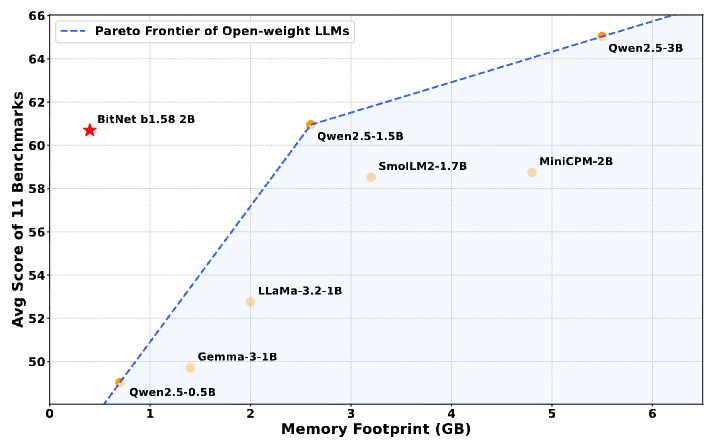
BitNet-b1.58-2B-4T 是首个官方 BitNet b1.58 模型,拥有 24 亿参数,在 4 万亿 tokens 上训练。它是一个三值(1.58-bit)语言模型,在提供与同等规模全精度模型相当性能的同时,实现了显著更快、更节能的推理。
- 快速 CPU 推理:相比全精度模型,在 x86 CPU 上实现最高 6.17x 加速,在 ARM CPU 上实现 5.07x 加速。
- 节能:在 x86 上能耗降低最高 82.2%,在 ARM 上降低 70.0%。
- GPU 支持:提供官方 GPU 推理 kernel 以加速部署。
- 支持对话:支持对话模式以便交互式使用。
🤗 Hugging Face | 🔗 在线 Demo | 📄 技术报告
2. BitNet-embedding-0.6B - 1-bit Embedding 模型
BitNet-embedding-0.6B 是一个 0.6B 参数的 1-bit embedding 模型,在提供具有竞争力的 embedding 质量的同时,实现了显著更快的 CPU 推理。它是首个证明三值权重可以在 embedding 任务上取得强大性能的模型。
- 在 prefill 阶段相比 F16 实现 1.42x 至 2.28x 加速(8 线程,x86)
- 无损质量:每个权重仅 2 bit,embedding 质量具有竞争力
- I2_S Kernel:在 x86 CPU 上支持优化的 I2_S 转换
3. BitNet-embedding-270M - 轻量级 1-bit Embedding 模型
BitNet-embedding-270M 是一个紧凑的 270M 参数 1-bit embedding 模型,专为资源受限环境设计,提供快速推理且内存占用极小。
- 在 prefill 阶段相比 F16 实现 1.32x 至 1.74x 加速(8 线程,x86)
- 无损质量:每个权重仅 2 bit,embedding 质量具有竞争力
- 轻量:仅 270M 参数,适用于边缘部署场景
支持的模型
| 模型 | 参数量 | CPU | Kernel | ||
|---|---|---|---|---|---|
| I2_S | TL1 | TL2 | |||
| 官方模型 | |||||
| BitNet-b1.58-2B-4T | 2.4B | x86 | ✅ | ❌ | ✅ |
| ARM | ✅ | ✅ | ❌ | ||
| BitNet-embedding-0.6B | 0.6B | x86 | ✅ | ❌ | ❌ |
| ARM | ❌ | ❌ | ❌ | ||
| BitNet-embedding-270M | 270M | x86 | ✅ | ❌ | ❌ |
| ARM | ❌ | ❌ | ❌ | ||
| 社区模型 | |||||
| bitnet_b1_58-large | 0.7B | x86 | ✅ | ❌ | ✅ |
| ARM | ✅ | ✅ | ❌ | ||
| bitnet_b1_58-3B | 3.3B | x86 | ❌ | ❌ | ✅ |
| ARM | ❌ | ✅ | ❌ | ||
| Llama3-8B-1.58-100B-tokens | 8.0B | x86 | ✅ | ❌ | ✅ |
| ARM | ✅ | ✅ | ❌ | ||
| Falcon3 系列 | 1B-10B | x86 | ✅ | ❌ | ✅ |
| ARM | ✅ | ✅ | ❌ | ||
| Falcon-E 系列 | 1B-3B | x86 | ✅ | ❌ | ✅ |
| ARM | ✅ | ✅ | ❌ | ||
❗️我们使用 Hugging Face 上现有的 1-bit LLM 来演示 bitnet.cpp 的推理能力。我们希望 bitnet.cpp 的发布能够推动 1-bit LLM 在模型规模和训练 tokens 方面向大规模场景发展。
安装
环境要求
- python>=3.10
- cmake>=3.22
- clang>=18
Windows 用户请安装 Visual Studio 2022。在安装程序中,至少勾选以下选项(这也会自动安装所需的附加工具,例如 CMake):
- Desktop-development with C++
- C++-CMake Tools for Windows
- Git for Windows
- C++-Clang Compiler for Windows
- MS-Build Support for LLVM-Toolset (clang)
Debian/Ubuntu 用户可通过自动安装脚本下载
bash -c "$(wget -O - https://apt.llvm.org/llvm.sh)"
- conda(强烈推荐)
从源码构建
[!IMPORTANT] 如果你使用的是 Windows,请务必始终使用 VS2022 的 Developer Command Prompt / PowerShell 来执行以下命令。如果遇到任何问题,请参阅下方的 FAQ。
- 克隆仓库
git clone --recursive https://github.com/microsoft/BitNet.git
cd BitNet
- 安装依赖
# (Recommended) Create a new conda environment
conda create -n bitnet-cpp python=3.10
conda activate bitnet-cpp

pip install -r requirements.txt
- 构建项目
# Manually download the model and run with local path
huggingface-cli download microsoft/BitNet-b1.58-2B-4T-gguf --local-dir models/BitNet-b1.58-2B-4T
python setup_env.py -md models/BitNet-b1.58-2B-4T -q i2_s
usage: setup_env.py [-h] [--hf-repo {1bitLLM/bitnet_b1_58-large,1bitLLM/bitnet_b1_58-3B,HF1BitLLM/Llama3-8B-1.58-100B-tokens,tiiuae/Falcon3-1B-Instruct-1.58bit,tiiuae/Falcon3-3B-Instruct-1.58bit,tiiuae/Falcon3-7B-Instruct-1.58bit,tiiuae/Falcon3-10B-Instruct-1.58bit}] [--model-dir MODEL_DIR] [--log-dir LOG_DIR] [--quant-type {i2_s,tl1}] [--quant-embd]
                    [--use-pretuned]

Setup the environment for running inference

optional arguments:
  -h, --help            show this help message and exit
  --hf-repo {1bitLLM/bitnet_b1_58-large,1bitLLM/bitnet_b1_58-3B,HF1BitLLM/Llama3-8B-1.58-100B-tokens,tiiuae/Falcon3-1B-Instruct-1.58bit,tiiuae/Falcon3-3B-Instruct-1.58bit,tiiuae/Falcon3-7B-Instruct-1.58bit,tiiuae/Falcon3-10B-Instruct-1.58bit}, -hr {1bitLLM/bitnet_b1_58-large,1bitLLM/bitnet_b1_58-3B,HF1BitLLM/Llama3-8B-1.58-100B-tokens,tiiuae/Falcon3-1B-Instruct-1.58bit,tiiuae/Falcon3-3B-Instruct-1.58bit,tiiuae/Falcon3-7B-Instruct-1.58bit,tiiuae/Falcon3-10B-Instruct-1.58bit}
                        Model used for inference
  --model-dir MODEL_DIR, -md MODEL_DIR
                        Directory to save/load the model
  --log-dir LOG_DIR, -ld LOG_DIR
                        Directory to save the logging info
  --quant-type {i2_s,tl1}, -q {i2_s,tl1}
                        Quantization type
  --quant-embd          Quantize the embeddings to f16
  --use-pretuned, -p    Use the pretuned kernel parameters
使用方法
基本用法
# Run inference with the quantized model
python run_inference.py -m models/BitNet-b1.58-2B-4T/ggml-model-i2_s.gguf -p "You are a helpful assistant" -cnv
usage: run_inference.py [-h] [-m MODEL] [-n N_PREDICT] -p PROMPT [-t THREADS] [-c CTX_SIZE] [-temp TEMPERATURE] [-cnv]

Run inference

optional arguments:
  -h, --help            show this help message and exit
  -m MODEL, --model MODEL
                        Path to model file
  -n N_PREDICT, --n-predict N_PREDICT
                        Number of tokens to predict when generating text
  -p PROMPT, --prompt PROMPT
                        Prompt to generate text from
  -t THREADS, --threads THREADS
                        Number of threads to use
  -c CTX_SIZE, --ctx-size CTX_SIZE
                        Size of the prompt context
  -temp TEMPERATURE, --temperature TEMPERATURE
                        Temperature, a hyperparameter that controls the randomness of the generated text
  -cnv, --conversation  Whether to enable chat mode or not (for instruct models.)
                        (When this option is turned on, the prompt specified by -p will be used as the system prompt.)
Demo
bitnet.cpp 在 Apple M2 上运行 BitNet b1.58 3B 模型的 demo:
https://github.com/user-attachments/assets/7f46b736-edec-4828-b809-4be780a3e5b1
基准测试
我们提供了脚本,可在给定模型的情况下运行推理基准测试。
usage: e2e_benchmark.py -m MODEL [-n N_TOKEN] [-p N_PROMPT] [-t THREADS]

Setup the environment for running the inference

required arguments:
  -m MODEL, --model MODEL
                        Path to the model file.

optional arguments:
  -h, --help
                        Show this help message and exit.
  -n N_TOKEN, --n-token N_TOKEN
                        Number of generated tokens.
  -p N_PROMPT, --n-prompt N_PROMPT
                        Prompt to generate text from.
  -t THREADS, --threads THREADS
                        Number of threads to use.
下面简要说明每个参数:
-m、--model:模型文件的路径。这是必需参数,运行脚本时必须提供。-n、--n-token:推理期间生成的 token 数量。这是一个可选参数,默认值为 128。-p、--n-prompt:用于生成文本的 prompt token 数量。这是一个可选参数,默认值为 512。-t、--threads:运行推理所使用的线程数。这是一个可选参数,默认值为 2。-h、--help:显示帮助信息并退出。使用此参数可显示用法信息。
例如:
python utils/e2e_benchmark.py -m /path/to/model -n 200 -p 256 -t 4
该命令将使用位于 /path/to/model 的模型运行推理基准测试,从 256 个 token 的 prompt 生成 200 个 token,并使用 4 个线程。
对于任何公开模型都不支持的模型布局,我们提供了脚本,用于按给定的模型布局生成一个 dummy(虚拟)模型,并在你的机器上运行基准测试:
python utils/generate-dummy-bitnet-model.py models/bitnet_b1_58-large --outfile models/dummy-bitnet-125m.tl1.gguf --outtype tl1 --model-size 125M

# Run benchmark with the generated model, use -m to specify the model path, -p to specify the prompt processed, -n to specify the number of token to generate
python utils/e2e_benchmark.py -m models/dummy-bitnet-125m.tl1.gguf -p 512 -n 128
从 .safetensors Checkpoint 转换
# Prepare the .safetensors model file
huggingface-cli download microsoft/bitnet-b1.58-2B-4T-bf16 --local-dir ./models/bitnet-b1.58-2B-4T-bf16

# Convert to gguf model
python ./utils/convert-helper-bitnet.py ./models/bitnet-b1.58-2B-4T-bf16
致谢
本项目基于 llama.cpp 框架构建。我们感谢所有作者对开源社区做出的贡献。此外,bitnet.cpp 的 kernel 建立在 T-MAC 中开创的 Lookup Table(查找表)方法之上。对于三值模型之外的一般低比特 LLM 推理,我们推荐使用 T-MAC。
常见问题(FAQ)📌
Q1: 由于 log.cpp 中 std::chrono 的问题,构建 llama.cpp 时出现错误导致构建失败?
A: 这是 llama.cpp 近期版本引入的一个问题。请参考讨论中的这个 commit 来修复此问题。
Q2: 如何在 Windows 的 conda 环境中使用 clang 构建?
A: 在构建项目之前,运行以下命令验证 clang 安装情况以及对 Visual Studio 工具的访问:
clang -v
该命令用于检查你使用的是否是正确的 clang 版本,以及 Visual Studio 工具是否可用。如果你看到类似以下的错误信息:
'clang' is not recognized as an internal or external command, operable program or batch file.
这表明你的命令行窗口没有正确初始化为 Visual Studio 工具环境。
• 如果你使用的是 Command Prompt,请运行:
"C:\Program Files\Microsoft Visual Studio\2022\Professional\Common7\Tools\VsDevCmd.bat" -startdir=none -arch=x64 -host_arch=x64
• 如果你使用的是 Windows PowerShell,请运行以下命令:
Import-Module "C:\Program Files\Microsoft Visual Studio\2022\Professional\Common7\Tools\Microsoft.VisualStudio.DevShell.dll" Enter-VsDevShell 3f0e31ad -SkipAutomaticLocation -DevCmdArguments "-arch=x64 -host_arch=x64"
这些步骤将初始化你的环境,让你能够使用正确的 Visual Studio 工具。