codegraph
为 Claude Code 预索引的代码知识图工具,通过 tree-sitter 解析和 SQLite 存储,让 AI 编码助手直接查询符号关系、调用图等,无需逐文件扫描。实测平均减少 92% 工具调用、提升 71% 探索速度;支持 19+ 语言和 Web 框架路由感知,100% 本地运行。值得关注的点是它大幅降低了 Claude Code 的 token 消耗和响应延迟,且自动同步文件变更。
README
CodeGraph
为 Claude Code 注入语义化代码智能
工具调用减少 94% · 探索速度提升 77% · 100% 本地化





快速开始
npx @colbymchenry/codegraph
交互式安装程序会自动配置 Claude Code
初始化项目
cd your-project
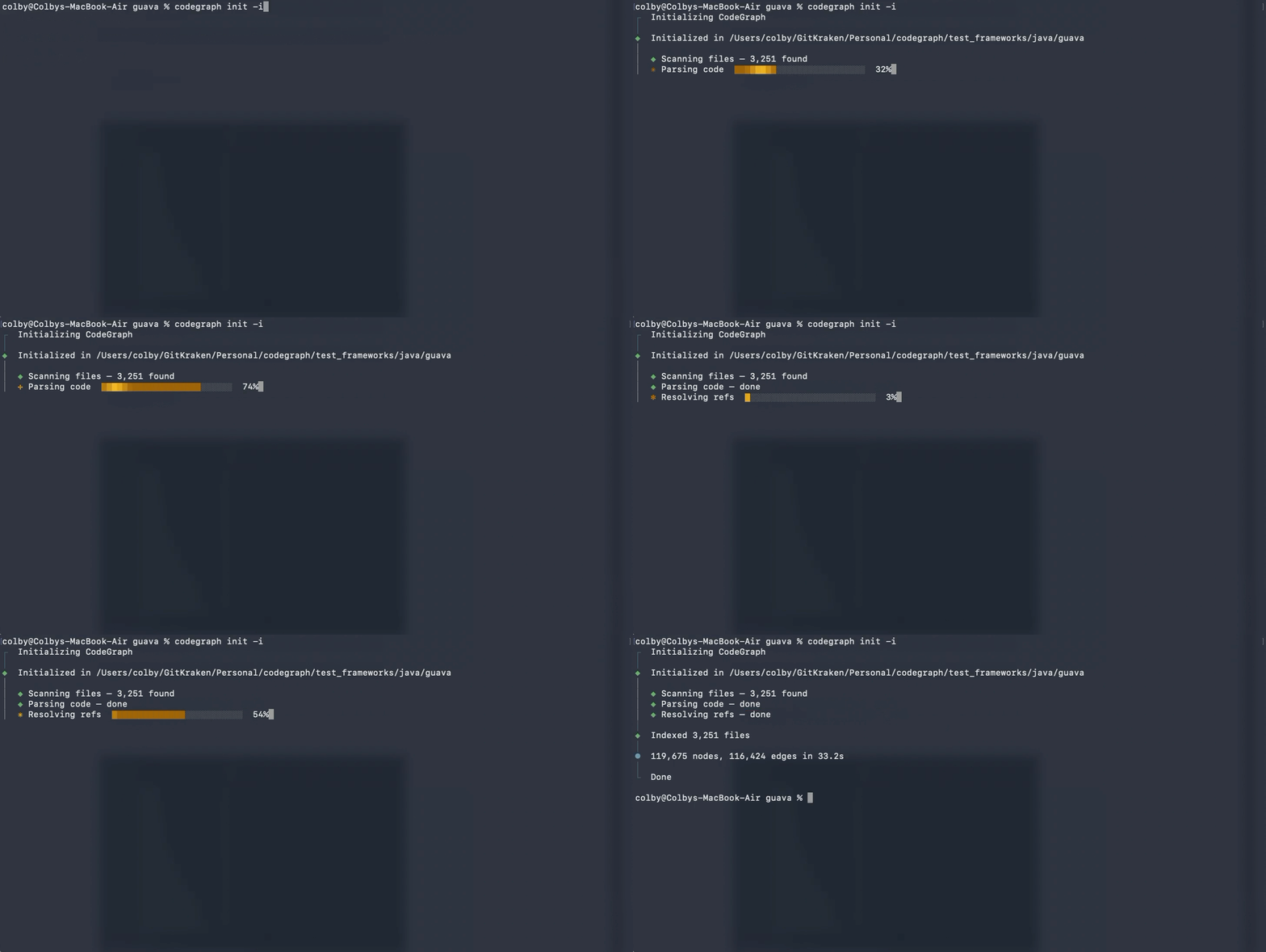
codegraph init -i
为什么选择 CodeGraph?
当 Claude Code 探索代码库时,它会生成 Explore agent(探索代理),这些代理使用 grep、glob 和 Read 扫描文件——每次工具调用都会消耗 token。
CodeGraph 为这些代理提供了一个预索引的知识图谱——包括符号关系、调用图(call graph)和代码结构。代理可以直接查询该图谱,而无需逐文件扫描。
基准测试结果
在 6 个真实代码库上进行了测试,对比 Claude Code 的 Explore agent 使用和未使用 CodeGraph 的表现:
平均:工具调用减少 92% · 速度提升 71%
| 代码库 | 使用 CodeGraph | 未使用 CodeGraph | 改进幅度 |
|---|---|---|---|
| VS Code · TypeScript | 3 次调用,17 秒 | 52 次调用,1 分 37 秒 | 减少 94% · 快 82% |
| Excalidraw · TypeScript | 3 次调用,29 秒 | 47 次调用,1 分 45 秒 | 减少 94% · 快 72% |
| Claude Code · Python + Rust | 3 次调用,39 秒 | 40 次调用,1 分 8 秒 | 减少 93% · 快 43% |
| Claude Code · Java | 1 次调用,19 秒 | 26 次调用,1 分 22 秒 | 减少 96% · 快 77% |
| Alamofire · Swift | 3 次调用,22 秒 | 32 次调用,1 分 39 秒 | 减少 91% · 快 78% |
| Swift Compiler · Swift/C++ | 6 次调用,35 秒 | 37 次调用,2 分 8 秒 | 减少 84% · 快 73% |
所有测试均使用 Claude Opus 4.6(1M 上下文)和 Claude Code v2.1.91。每个测试生成一个 Explore agent ,并询问相同的问题。
使用的查询:
| 代码库 | 查询问题 |
|---|---|
| VS Code | "扩展主机如何与主进程通信?" |
| Excalidraw | "协作编辑和实时同步是如何工作的?" |
| Claude Code (Python+Rust) | "工具执行端到端是如何工作的?" |
| Claude Code (Java) | "工具执行端到端是如何工作的?" |
| Alamofire | "追踪请求从 Session.request() 到 URLSession 层的完整流程" |
| Swift Compiler | "Swift 编译器如何处理错误诊断?" |
使用 CodeGraph — 代理使用 codegraph_explore 后停止:
| 代码库 | 已索引文件数 | 节点数 | 工具使用次数 | Token 数 | 用时 | 文件读取数 |
|---|---|---|---|---|---|---|
| VS Code (TypeScript) | 4,002 | 59,377 | 3 | 56.6k | 17 秒 | 0 |
| Excalidraw (TypeScript) | 626 | 9,859 | 3 | 57.1k | 29 秒 | 0 |
| Claude Code (Python+Rust) | 115 | 3,080 | 3 | 67.1k | 39 秒 | 0 |
| Claude Code (Java) | — | — | 1 | 40.8k | 19 秒 | 0 |
| Alamofire (Swift) | 102 | 2,624 | 3 | 57.3k | 22 秒 | 0 |
| Swift Compiler (Swift/C++) | 25,874 | 272,898 | 6 | 77.4k | 35 秒 | 0 |
未使用 CodeGraph — 代理大量使用 grep、find、ls 和 Read:
| 代码库 | 工具使用次数 | Token 数 | 用时 | 文件读取数 |
|---|---|---|---|---|
| VS Code (TypeScript) | 52 | 89.4k | 1 分 37 秒 | ~15 |
| Excalidraw (TypeScript) | 47 | 77.9k | 1 分 45 秒 | ~20 |
| Claude Code (Python+Rust) | 40 | 69.3k | 1 分 8 秒 | ~15 |
| Claude Code (Java) | 26 | 73.3k | 1 分 22 秒 | ~15 |
| Alamofire (Swift) | 32 | 52.4k | 1 分 39 秒 | ~10 |
| Swift Compiler (Swift/C++) | 37 | 99.1k | 2 分 8 秒 | ~20 |
关键观察:
- 使用 CodeGraph 时,代理从未回退到读取文件——它完全信任 codegraph_explore 的结果
- 未使用 CodeGraph 时,代理大部分时间花费在发现阶段(find、ls、grep),然后才能开始读取相关代码
- Java 代码库只需 1 次 codegraph_explore 调用就回答了完整问题
- 跨语言查询(Python+Rust)无缝工作——CodeGraph 的图遍历能够跨越语言边界找到连接
- Swift 基准测试(Alamofire)追踪了从
Session.request()到URLSession.dataTask()的 9 步调用链——CodeGraph 在深度 3 的图遍历中通过一次 explore 调用捕获了完整链 - Swift Compiler 基准测试是测试过的最大代码库(25,874 个文件,272,898 个节点)——CodeGraph 在 4 分钟内完成索引,代理在 35 秒内通过 6 次 explore 调用且零文件读取回答了一个复杂的横切问题
关键特性
| 智能上下文构建 | 一次工具调用即可返回入口点、相关符号和代码片段——无需昂贵的探索代理 |
| 全文搜索 | 通过 FTS5 驱动,在整个代码库中即时按名称查找代码 |
| 影响分析 | 追踪任何符号的调用者、被调用者以及完整的变更影响半径 |
| 始终新鲜 | 文件监听器使用原生 OS 事件(FSEvents/inotify/ReadDirectoryChangesW),带有防抖自动同步——在编写代码时图谱保持最新,零配置 |
| 19+ 种语言 | TypeScript, JavaScript, Python, Go, Rust, Java, C#, PHP, Ruby, C, C++, Swift, Kotlin, Dart, Svelte, Liquid, Pascal/Delphi |
| 框架感知路由 | 识别 Web 框架的路由文件,并通过 references 边将 URL 模式链接到其处理器类或函数,覆盖 13 个框架 |
| 100% 本地化 | 无数据离开机器。无需 API 密钥。无需外部服务。仅使用 SQLite 数据库 |
框架感知路由
CodeGraph 检测 Web 框架的路由文件,并以 route 节点形式输出,通过 references 边链接到对应的处理器类或函数。查询视图/控制器的调用者现在可以显示出绑定它的 URL 模式。
| 框架 | 可识别的形式 |
|---|---|
| Django | path(), re_path(), url(), include() in urls.py (CBV .as_view(), dotted paths) |
| Flask | @app.route('/path', methods=[...]), blueprint routes |
| FastAPI | @app.get(...), @router.post(...), all standard methods |
| Express | app.get(...), router.post(...) with middleware chains |
| Laravel | Route::get(), Route::resource(), Controller@action, tuple syntax |
| Rails | get '/x', to: 'users#index', hash-rocket => syntax |
| Spring | @GetMapping, @PostMapping, @RequestMapping on methods |
| Gin / chi / gorilla / mux | r.GET(...), router.HandleFunc(...) |
| Axum / actix / Rocket | .route("/x", get(handler)) |
| ASP.NET | [HttpGet("/x")] attributes on action methods |
| Vapor | app.get("x", use: handler) |
| React Router / SvelteKit | Route component nodes |
快速开始
1. 运行安装程序
npx @colbymchenry/codegraph
安装程序会:
- 提示全局安装
codegraph(MCP 服务器需要) - 在
~/.claude.json中配置 MCP 服务器 - 设置 CodeGraph 工具的自动允许权限
- 向
~/.claude/CLAUDE.md添加全局指令 - 可选地初始化当前项目
2. 重启 Claude Code
重启 Claude Code 以加载 MCP 服务器。
3. 初始化项目
cd your-project
codegraph init -i
就是这样!当 .codegraph/ 目录存在时,Claude Code 会自动使用 CodeGraph 工具。
全局安装:
npm install -g @colbymchenry/codegraph
添加到 ~/.claude.json:
{
  "mcpServers": {
    "codegraph": {
      "type": "stdio",
      "command": "codegraph",
      "args": ["serve", "--mcp"]
    }
  }
}
添加到 ~/.claude/settings.json(可选,用于自动允许):
{
  "permissions": {
    "allow": [
      "mcp__codegraph__codegraph_search",
      "mcp__codegraph__codegraph_context",
      "mcp__codegraph__codegraph_callers",
      "mcp__codegraph__codegraph_callees",
      "mcp__codegraph__codegraph_impact",
      "mcp__codegraph__codegraph_node",
      "mcp__codegraph__codegraph_status",
      "mcp__codegraph__codegraph_files"
    ]
  }
}
安装程序会自动将这些指令添加到 ~/.claude/CLAUDE.md:
## CodeGraph

CodeGraph 构建代码库的语义知识图谱,用于更快速、更智能的代码探索。

### 如果项目中存在 `.codegraph/`

**绝对不要在主会话中直接调用 `codegraph_explore` 或 `codegraph_context`。** 这些工具会返回大量源代码,占用主会话上下文。相反,对于任何探索性问题(例如"X 是如何工作的?"、"解释 Y 系统"、"Z 在哪里实现?"),务必生成一个 Explore agent。

**生成 Explore agent 时**,在提示词中包含以下指令:

> 该项目已初始化 CodeGraph(存在 .codegraph/)。请将 `codegraph_explore` 作为主要工具——它一次调用即可返回所有相关文件的完整源代码片段。
>
> **规则:**
> 1. 遵循 `codegraph_explore` 工具描述中的探索调用预算——它会根据项目大小自动调整。
> 2. 不要重新读取 `codegraph_explore` 已经返回源代码的文件。这些源代码段是完整且权威的。
> 3. 仅在需要更多细节时,才回退到 grep/glob/read 来读取"其他相关文件"列表中提及的文件,或者当 codegraph 没有返回结果时。

**主会话只能直接使用这些轻量级工具**(用于在编辑前进行有针对性的查找,而非探索):

| 工具 | 用途 |
|------|---------|
| `codegraph_search` | 按名称查找符号 |
| `codegraph_callers` / `codegraph_callees` | 追踪调用流程 |
| `codegraph_impact` | 检查编辑前哪些内容会受影响 |
| `codegraph_node` | 获取单个符号的详细信息 |

### 如果 `.codegraph/` 不存在

在会话开始时,询问用户是否希望初始化 CodeGraph:

"我注意到该项目尚未初始化 CodeGraph。您是否希望我运行 `codegraph init -i` 来构建代码知识图谱?"
工作原理
┌─────────────────────────────────────────────────────────────────┐
│                        Claude Code                               │
│                                                                  │
│  "Implement user authentication"                                 │
│           │                                                      │
│           ▼                                                      │
│  ┌─────────────────┐      ┌─────────────────┐                   │
│  │  Explore Agent  │ ──── │  Explore Agent  │                   │
│  └────────┬────────┘      └────────┬────────┘                   │
│           │                        │                             │
└───────────┼────────────────────────┼─────────────────────────────┘
            │                        │
            ▼                        ▼
┌───────────────────────────────────────────────────────────────────┐
│                     CodeGraph MCP Server                          │
│  ┌─────────────┐  ┌─────────────┐  ┌─────────────┐               │
│  │   Search    │  │   Callers   │  │   Context   │               │
│  │  "auth"     │  │  "login()"  │  │  for task   │               │
│  └──────┬──────┘  └──────┬──────┘  └──────┬──────┘               │
│         │                │                │                       │
│         └────────────────┼────────────────┘                       │
│                          ▼                                        │
│              ┌───────────────────────┐                            │
│              │   SQLite Graph DB     │                            │
│              │   • 387 symbols       │                            │
│              │   • 1,204 edges       │                            │
│              │   • Instant lookups   │                            │
│              └───────────────────────┘                            │
└───────────────────────────────────────────────────────────────────┘
提取 — tree-sitter 将源代码解析为 AST。特定于语言的查询提取节点(函数、类、方法)和边(调用、导入、继承、实现)。
存储 — 所有内容存储在本地 SQLite 数据库(
.codegraph/codegraph.db)中,支持 FTS5 全文搜索。解析 — 提取完成后,解析引用:函数调用 → 定义,导入 → 源文件,类继承以及特定于框架的模式。
自动同步 — MCP 服务器使用原生 OS 文件事件监听您的项目。变更经过防抖处理(2 秒静默窗口),仅过滤源代码文件,并进行增量同步。在您编写代码时,图谱始终保持最新——无需任何配置。
CLI 参考
codegraph                         # 运行交互式安装程序
codegraph install                 # 运行安装程序(显式)
codegraph init [path]             # 在项目中初始化(--index 用于同时索引)
codegraph uninit [path]           # 从项目中移除 CodeGraph(--force 跳过确认)
codegraph index [path]            # 完整索引(--force 强制重新索引,--quiet 减少输出)
codegraph sync [path]             # 增量更新
codegraph status [path]           # 显示统计信息
codegraph query <search>          # 搜索符号(--kind, --limit, --json)
codegraph files [path]            # 显示文件结构(--format, --filter, --max-depth, --json)
codegraph context <task>          # 为 AI 构建上下文(--format, --max-nodes)
codegraph affected [files...]     # 查找受变更影响的测试文件(见下方说明)
codegraph serve --mcp             # 启动 MCP 服务器
codegraph affected
通过递归追踪导入依赖关系,查找受变更源文件影响的测试文件。
codegraph affected src/utils.ts src/api.ts         # 传递文件作为参数
git diff --name-only | codegraph affected --stdin   # 从 git diff 管道输入
codegraph affected src/auth.ts --filter "e2e/*"     # 自定义测试文件匹配模式
| 选项 | 描述 | 默认值 |
|---|---|---|
--stdin |
从标准输入读取文件列表 | false |
-d, --depth <n> |
最大依赖遍历深度 | 5 |
-f, --filter <glob> |
自定义 glob 模式以识别测试文件 | 自动检测 |
-j, --json |
输出为 JSON | false |
-q, --quiet |
仅输出文件路径 | false |
CI/钩子示例:
#!/usr/bin/env bash
AFFECTED=$(git diff --name-only HEAD | codegraph affected --stdin --quiet)
if [ -n "$AFFECTED" ]; then
  npx vitest run $AFFECTED
fi
MCP 工具
当作为 MCP 服务器运行时,CodeGraph 将以下工具暴露给 Claude Code:
| 工具 | 用途 |
|---|---|
codegraph_search |
在整个代码库中按名称查找符号 |
codegraph_context |
为任务构建相关的代码上下文 |
codegraph_callers |
查找哪些地方调用了某个函数 |
codegraph_callees |
查找某个函数调用了哪些地方 |
codegraph_impact |
分析修改某个符号会影响到哪些代码 |
codegraph_node |
获取特定符号的详细信息(可选包含源代码) |
codegraph_files |
获取已索引的文件结构(比扫描文件系统更快) |
codegraph_status |
检查索引健康状况和统计信息 |
作为库使用
import CodeGraph from '@colbymchenry/codegraph';

const cg = await CodeGraph.init('/path/to/project');
// 或者:const cg = await CodeGraph.open('/path/to/project');

await cg.indexAll({
  onProgress: (p) => console.log(`${p.phase}: ${p.current}/${p.total}`)
});

const results = cg.searchNodes('UserService');
const callers = cg.getCallers(results[0].node.id);
const context = await cg.buildContext('fix login bug', { maxNodes: 20, includeCode: true, format: 'markdown' });
const impact = cg.getImpactRadius(results[0].node.id, 2);

cg.watch();   // 文件变更时自动同步
cg.unwatch(); // 停止监听
cg.close();
配置
.codegraph/config.json 文件控制索引行为:
{
  "version": 1,
  "languages": ["typescript", "javascript"],
  "exclude": ["node_modules/**", "dist/**", "build/**", "*.min.js"],
  "frameworks": [],
  "maxFileSize": 1048576,
  "extractDocstrings": true,
  "trackCallSites": true
}
| 选项 | 描述 | 默认值 |
|---|---|---|
languages |
要索引的语言(留空则自动检测) | [] |
exclude |
忽略的 glob 模式 | ["node_modules/**", ...] |
frameworks |
框架提示,用于更好的解析 | [] |
maxFileSize |
跳过大于此值的文件(字节) | 1048576 (1MB) |
extractDocstrings |
从代码中提取文档字符串 | true |
trackCallSites |
跟踪调用点位置 | true |
支持的语言
| 语言 | 扩展名 | 状态 |
|---|---|---|
| TypeScript | .ts, .tsx |
完整支持 |
| JavaScript | .js, .jsx, .mjs |
完整支持 |
| Python | .py |
完整支持 |
| Go | .go |
完整支持 |
| Rust | .rs |
完整支持 |
| Java | .java |
完整支持 |
| C# | .cs |
完整支持 |
| PHP | .php |
完整支持 |
| Ruby | .rb |
完整支持 |
| C | .c, .h |
完整支持 |
| C++ | .cpp, .hpp, .cc |
完整支持 |
| Swift | .swift |
完整支持 |
| Kotlin | .kt, .kts |
完整支持 |
| Scala | .scala, .sc |
完整支持(类、特质、方法、类型别名、Scala 3 枚举) |
| Dart | .dart |
完整支持 |
| Svelte | .svelte |
完整支持(脚本提取、Svelte 5 runes、SvelteKit 路由) |
| Vue | .vue |
完整支持(script + script-setup 提取、Nuxt 页面/API/中间件路由) |
| Liquid | .liquid |
完整支持 |
| Pascal / Delphi | .pas, .dpr, .dpk, .lpr |
完整支持(类、记录、接口、枚举、DFM/FMX 表单文件) |
故障排除
"CodeGraph not initialized" — 首先在项目目录中运行 codegraph init。
索引速度慢 — 检查是否已排除 node_modules 和其他大型目录。使用 --quiet 减少输出开销。
索引速度慢 / MCP 出现 database is locked / WASM 回退激活 — codegraph 内置了 WASM SQLite 回退方案,用于 better-sqlite3(一个原生模块,声明为 optionalDependencies)无法安装的环境。回退方案比原生后端慢 5-10 倍,并使用一种日志模式,允许写入者阻塞读取者,因此在索引运行时 MCP 查询也可能遇到 database is locked。运行 codegraph status 并查看 Backend: 行:
Backend: native— 您处于快速路径,无需操作。Backend: wasm— 您处于慢速回退路径。常见原因:缺少 C 构建工具、预编译二进制文件不适用于您的 Node 版本、或安装后 Node 版本发生变化。修复方法:# macOS xcode-select --install # 安装 C 编译器 # Linux (Debian / Ubuntu) sudo apt install build-essential python3 make # Linux (RHEL / Fedora) sudo yum groupinstall "Development Tools" # 然后在任何平台上重新构建: npm rebuild better-sqlite3 # 或强制将其作为硬依赖包含: npm install better-sqlite3 --save修复后,
codegraph status应显示Backend: native。
MCP 服务器无法连接 — 确保项目已初始化/索引,验证 MCP 配置中的路径,并检查 codegraph serve --mcp 是否能在命令行中正常工作。
缺失符号 — MCP 服务器会在保存时自动同步(稍等几秒钟)。如有需要,可手动运行 codegraph sync。检查文件的语言是否受支持,且未被配置模式排除。
许可证
MIT
献给 Claude Code 社区