auto-ontology
把企业元数据编译成带业务语义的本体图谱,为 LLM 与 agent 的 NL-to-SQL 提供可信的术语定义、join 关系和可复用 SQL 属性。采用「自动生成—人工认证—问答」三阶段流程,答案会附带 SQL、join 路径和溯源,并可通过 MCP、CLI、REST API 接入 Cursor、Claude Desktop 等 agent 客户端;当数据无法回答时,它还会提示缺少哪些方面的覆盖。默认使用 NVIDIA NIM 模型,支持十种数据库和 Helm/Docker 部署。注意:Apache 2.0,项目按 AS IS 提供,当前不接受外部 PR。
README
Auto Ontology
Agent 能够检索文档、查询数据库,但可靠性才是 agentic analytics 的前提:一个营收指标如果数字算错了,回答得再快也毫无价值。Agent 需要一个 context layer(上下文层),告诉它数据存放在哪里、含义是什么、是否该用、如何使用、来自何处,以及哪些内容与之相似。NVIDIA Auto Ontology 是一个开放库,它从企业元数据构建这一层,跨系统对齐定义,并通过 MCP、CLI 和 API 将其暴露给任意 agent harness。它与客户已有的 semantic model 互为补充。
它让开发者能够:
- Discover(发现):从元数据生成企业 ontology;连接已有的 ontology 与 semantic model;构建面向 AI 的知识图谱。
- Ground(锚定):为 agent 提供指标、实体和关系的可信业务含义;对齐跨系统不一致的定义。
- Validate(校验):用已认证的定义和 lineage(血缘)校验生成的查询;每个答案都附带 provenance(来源信息)。
- Expose(暴露):通过 MCP、CLI 和 API 向任意 agent harness 提供上下文。 Learn(学习):把已认证的修正和使用反馈回 ontology,让共享上下文随每一次提问而改进。
Benchmarks
要运行 BIRD 之类的 text-to-SQL benchmark,请参考 ontology SQL evaluation 仓库。
许可与贡献。 Auto Ontology 依据 Apache License 2.0 分发。本项目捆绑、链接或以其他方式使用的第三方开源组件 列于
THIRD_PARTY_NOTICES.md。本项目 当前不接受外部贡献。
核心特性
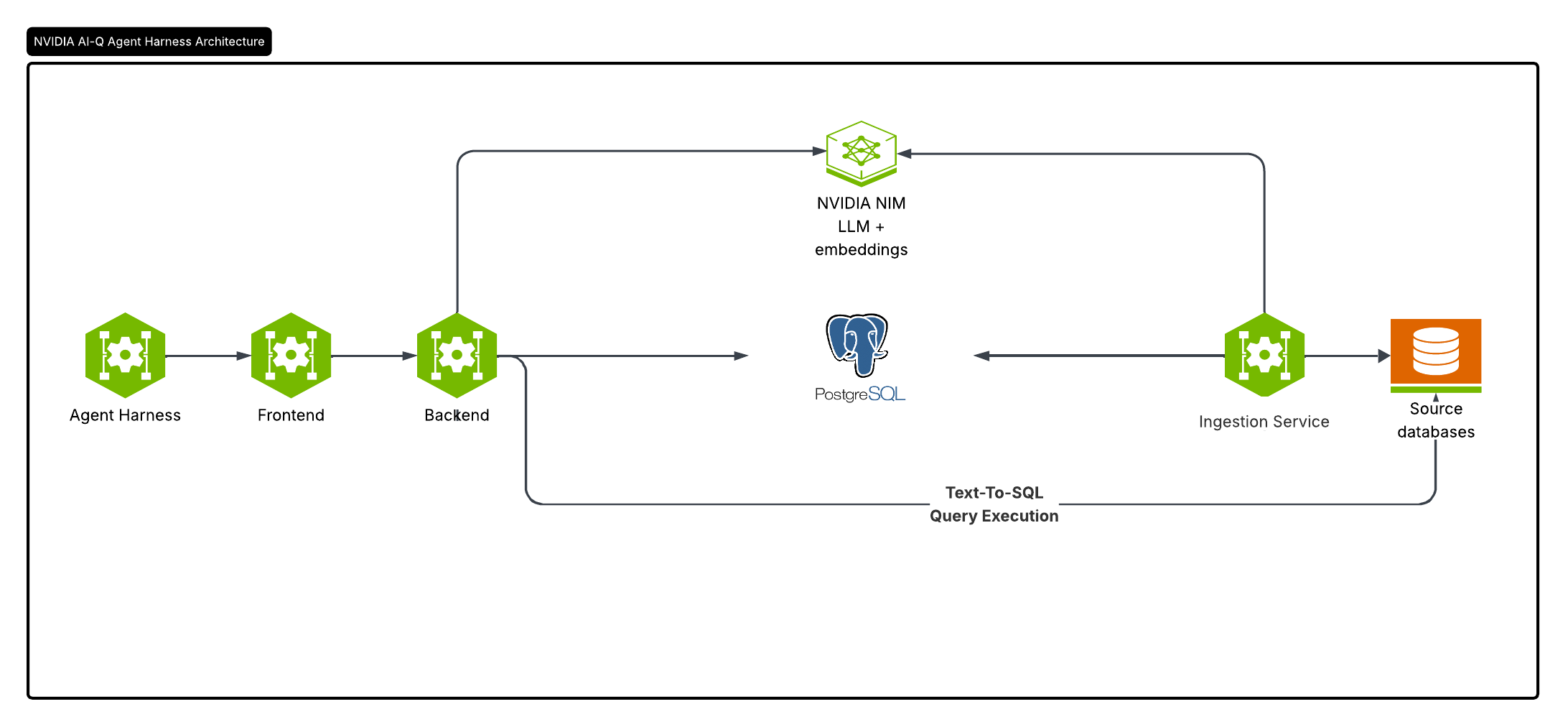
- 对结构化数据的自然语言查询 —— 问题被翻译为 SQL,并在已连接的数据库上执行,由 NVIDIA NIM 提供支持。
- 面向关系型数据源的 semantic catalog / ontology 层,与其所描述的 catalog 一并存储于 Postgres 中。
- 认证与 RBAC —— 使用 Better Auth。
- Web UI,用于对话、分析、data catalog、analytics 和设置。
- 灵活部署 —— Kubernetes 用 Helm chart,本地栈用 Docker Compose。
软件组件
| 组件 | 技术 | 职责 | 默认端口 |
|---|---|---|---|
| 前端 | Next.js 16 (React 19, TypeScript, Tailwind CSS 4), Better Auth, Prisma | Web UI、认证、API gateway | 3000 |
| 后端 | FastAPI (Python 3.12+), LangChain | Chat / NL-to-SQL、catalog、datasource API | 3001 |
| 摄取 worker | FastAPI (Python 3.12+) | 摄取表格数据并写入 embedding | 3002 |
| Postgres + pgvector | Relational Database | 应用元数据、catalog 与 ontology、vector store | 5432 |
| HashiCorp Vault | 可选 | 安全存储连接凭据 | — |
NVIDIA NIM
Auto Ontology 使用 NVIDIA NIM endpoint 进行 inference —— 既可以是托管的
NVIDIA API catalog(integrate.api.nvidia.com),也可以是
自托管 NIM。.env.example 中的默认值为:
- LLM:
nvidia/nemotron-3.5-lightning-30b-a3b - Embeddings:
nvidia/nemotron-3-embed-1b - Reranking:
nvidia/llama-nemotron-rerank-vl-1b-v2
endpoint 和模型通过 DEFAULT_MODELS_ENDPOINT、DEFAULT_MODELS_MODEL、
EMBED_ENDPOINT 和 EMBED_MODEL 环境变量配置,并且需要一个
DEFAULT_MODELS_API_KEY。
模型三元组
每个模型角色由一组三元组环境变量配置 ——
<PREFIX>_ENDPOINT(URL)、<PREFIX>_API_KEY 和 <PREFIX>_MODEL:
| 前缀 | 角色 |
|---|---|
DEFAULT_MODELS |
共享默认值;下面每个字段都会回落到它。 |
REASONING |
主 chat / NL-to-SQL 模型。 |
NON_REASONING |
用于实体抽取的较轻量模型。 |
EMBED |
文本 embedding 模型(摄取与查询时必须一致)。 |
RERANK |
检索流程使用的 reranker。 |
你可以设置完整的三元组、只设置其中部分字段,或完全不设置 —— 任何未设置的字段
都会回落到对应的 DEFAULT_MODELS_<FIELD>。因此最简单的配置方式是填好
DEFAULT_MODELS_*,仅在字段有差异时按角色覆盖(例如 EMBED_MODEL、NON_REASONING_MODEL)。为保持向后兼容,*_API_KEY 也会回落到旧版的 NVIDIA_API_KEY。
快速开始
本节用 Docker Compose 针对 Wide World Importers(微软的示例销售数据库)运行 Auto-Ontology。你需要 Docker(含 Compose v2)、
uv,以及来自
build.nvidia.com 的 NVIDIA API key(nvapi-...)。
克隆仓库并创建
.env:git clone https://github.com/NVIDIA/auto-ontology.git && cd auto-ontology cp .env.example .env然后在
.env中设置这些值:DEFAULT_MODELS_API_KEY=nvapi-... AUTH_SECRET=<a long random string, e.g. from openssl rand -base64 32> APP_URL=http://localhost:3000 POSTGRES_PASSWORD=<a new password> CONNECTION_STRINGS=postgresql://postgres:<the same password>@postgres:5432/wideworldimporters AUTO_ONTOLOGY_ADMIN_PASSWORD=<a new password> PGADMIN_PASSWORD=<a new password>Compose 会把 Postgres、pgAdmin 和 web 应用发布到主机上,因此启动前请逐一替换 默认密码。
.env.example还为每个模型角色设置了 API key:把每个nvapi-your-api-key-here替换为你的 key,或者 删除这些行,让它们回落到DEFAULT_MODELS_API_KEY。启动 Postgres 并加载示例数据库。seed 脚本位于 auto-ontology-eval;把你设置的 Postgres 密码传给它:
docker compose up -d --wait postgres
git clone https://github.com/NVIDIA/auto-ontology-eval.git ../auto-ontology-eval
(cd ../auto-ontology-eval && uv sync && cp .env.example .env && \
  POSTGRES_PASSWORD='<the same password>' \
  uv run python scripts/seed/seed_wwi.py --database-name wideworldimporters --drop)
构建并启动栈的其余部分:
docker compose up -d --build打开 http://localhost:3000,用
.env中的AUTO_ONTOLOGY_ADMIN_EMAIL和AUTO_ONTOLOGY_ADMIN_PASSWORD登录。进入 Settings → Semantic Compilation 并开启。摄取在启动时运行;编译会立即开始,完成后会显示 Semantic compilation is ready。在 Chat 中提问:
What was revenue for the USB food flash drive - sushi roll in Pennsylvania in June 2015?
Agent 会把 revenue、product 和 state 解析为 ontology 中的 term,沿它们的关系找到所需的 join,然后执行 查询。答案会连同其 SQL 和产生该答案的步骤一起返回, 方便你对照源数据核对结果:
Answer:  Revenue for USB food flash drive - sushi roll in Pennsylvania in
         June 2015 was $588.80, from 3 invoice lines.

SQL:     SELECT SUM(il.extendedprice) AS revenue, COUNT(*) AS invoice_lines
         FROM sales.invoicelines il
         JOIN sales.invoices i             ON il.invoiceid = i.invoiceid
         JOIN warehouse.stockitems si      ON il.stockitemid = si.stockitemid
         JOIN sales.customers c            ON i.customerid = c.customerid
         JOIN application.cities ct        ON c.deliverycityid = ct.cityid
         JOIN application.stateprovinces sp ON ct.stateprovinceid = sp.stateprovinceid
         WHERE si.stockitemname = 'USB food flash drive - sushi roll'
           AND sp.stateprovincename = 'Pennsylvania'
           AND i.invoicedate >= '2015-06-01' AND i.invoicedate < '2015-07-01'

Steps:   Resolved terms: Invoice Line (revenue), Stock Item, State Province, Invoice
         Joined: invoice line -> invoice -> customer -> city -> state province
         Validated the filter values against the data, then executed
问一个数据无法回答的问题。Wide World Importers 没有 广告数据,因此关于广告支出的问题没有可供解析的依据。通过 MCP 连接的 agent 会先检查可回答性,然后请你澄清:
You:    What was return on ad spend for the sushi roll flash drive in June 2015?
Agent:  check_answerable -> coverage 0.5; no term covers "ad spend"
Agent:  I can find revenue for that product, but this data has no
        advertising spend, so I can't compute return on ad spend. Do you
        want June 2015 revenue instead, or is ad spend tracked in another
        source I should connect?
如果重启后 UI 加载出来却没有左侧导航,说明浏览器持有过期的 session cookie。清除 localhost:3000 的站点数据后重新登录。其他启动失败的问题参见
setup skill 的故障排查指南。
工作原理
Auto-Ontology 分