stable-diffusion-webui
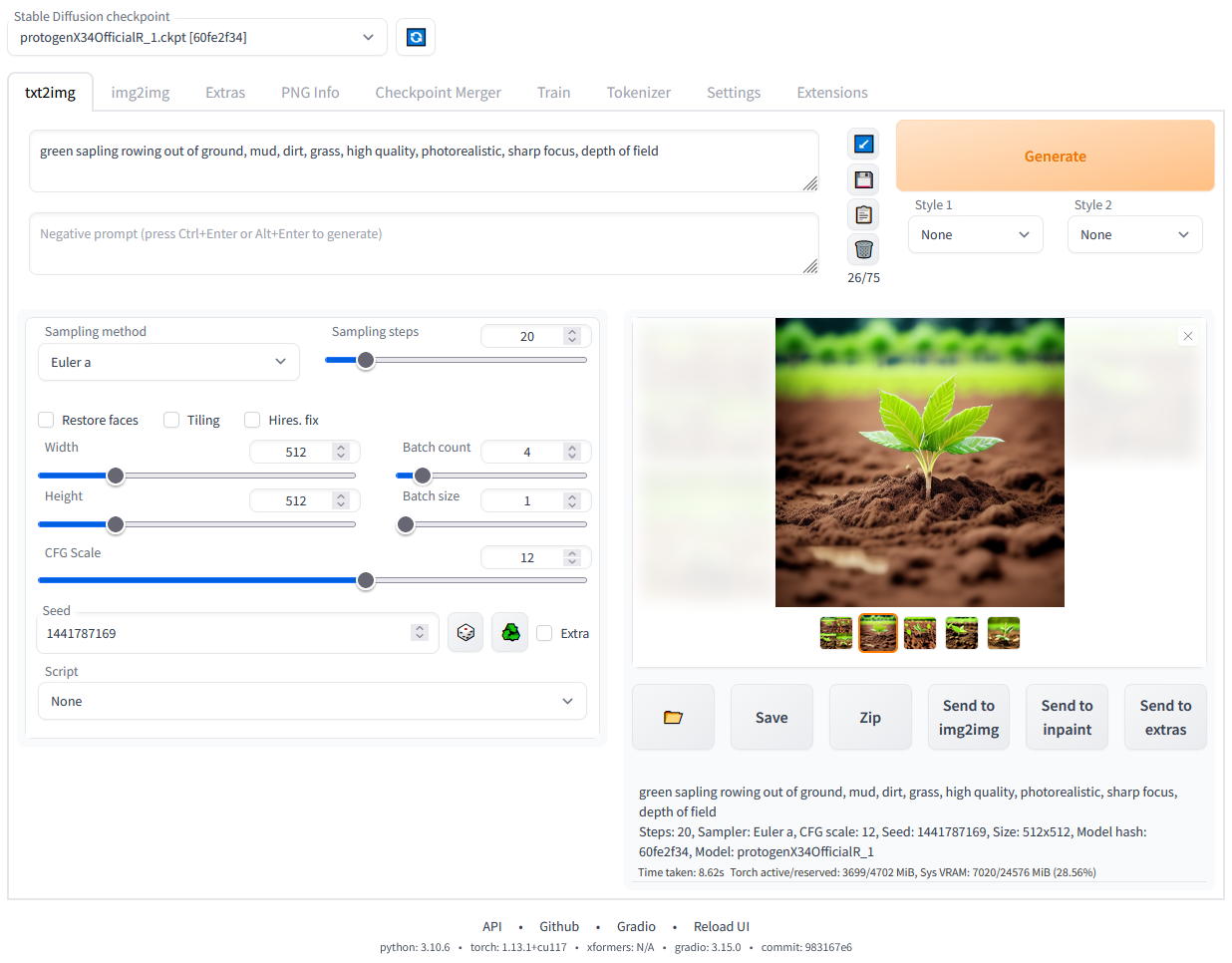
Stable Diffusion 的图形界面工具箱,集成文生图、图生图、修复放大等常见功能,支持 LoRA、Textual Inversion、Hypernetwork 等微调技术。作为最流行的 SD 前端之一,它拥有丰富的社区扩展生态和一键安装脚本,降低使用门槛,且持续兼容新模型和优化(如 xformers、4GB 显存支持),是目前本地部署 SD 的标杆级项目。
README
Stable Diffusion web UI
基于 Gradio 库实现的 Stable Diffusion 网页界面。
功能特性
- 原始的 txt2img 和 img2img 模式
- 一键安装并运行脚本(但你仍需自行安装 Python 和 git)
- Outpainting(外补绘)
- Inpainting(内补绘)
- 彩色草图
- Prompt Matrix(提示矩阵)
- Stable Diffusion Upscale(超分辨率)
- Attention(注意力机制),指定模型应更加关注的文本部分
a man in a ((tuxedo))—— 会更加关注 tuxedo(燕尾服)a man in a (tuxedo:1.21)—— 替代语法- 选中文本后按
Ctrl+Up或Ctrl+Down(在 macOS 上为Command+Up或Command+Down)可自动调整选中部分的注意力权重(代码由匿名用户贡献)
- Loopback(回环),多次运行 img2img 处理
- X/Y/Z 图表,用于绘制不同参数下图像的三维图表
- Textual Inversion(文本反转)
- 可拥有任意数量的 embedding,并可为其使用任何你喜欢的名称
- 支持每个 token 使用不同数量向量的多个 embedding
- 兼容半精度浮点数
- 在 8GB 显存上训练 embedding(也有 6GB 显存能用的报告)
- Extras(附加)选项卡,包含:
- GFPGAN,用于修复人脸的神经网络
- CodeFormer,作为 GFPGAN 替代方案的面部修复工具
- RealESRGAN,神经网络超分辨率器
- ESRGAN,支持大量第三方模型的神经网络超分辨率器
- SwinIR 和 Swin2SR(见此),神经网络超分辨率器
- LDSR,潜在扩散超分辨率放大
- 调整宽高比的选项
- 采样方法选择
- 调整采样器 eta 值(噪声乘数)
- 更高级的噪声设置选项
- 随时中断处理
- 支持 4GB 显存显卡(也有 2GB 显存能用的报告)
- 批处理时种子正确
- 实时提示词 token 长度验证
- 生成参数
- 生成图像所用的参数会随图像保存
- PNG 格式保存在 PNG 块中,JPEG 格式保存在 EXIF 中
- 可将图像拖拽到 PNG Info(PNG 信息)选项卡以恢复生成参数并自动复制到 UI
- 可在设置中禁用
- 拖放图像/文本参数到提示词输入框
- “读取生成参数”按钮,将参数加载到 UI 的提示词输入框中
- 设置页面
- 从 UI 运行任意 Python 代码(必须使用
--allow-code参数启用) - 大多数 UI 元素的鼠标悬停提示
- 可通过文本配置文件更改 UI 元素的默认值/最小值/最大值/步长
- 平铺支持,一个复选框,用于创建可像纹理一样平铺的图像
- 进度条和实时图像生成预览
- 可使用独立的神经网络,几乎不消耗 VRAM 或计算资源来生成预览
- 负面提示词(Negative prompt),一个额外的文本字段,允许你列出不希望出现在生成图像中的内容
- 样式(Styles),可保存部分提示词并通过下拉菜单轻松应用
- 变体(Variations),生成相同图像但带有微小差异的方式
- 种子缩放(Seed resizing),生成相同图像但分辨率略有不同的方式
- CLIP interrogator(CLIP 检索器),一个按钮,尝试从图像中猜测提示词
- Prompt Editing(提示词编辑),在生成过程中更改提示词的方式,例如一开始生成西瓜,中途切换到动漫女孩
- Batch Processing(批处理),使用 img2img 处理一组文件
- Img2img 替代方案,反向欧拉交叉注意力控制方法
- Highres Fix(高分辨率修复),一个便捷选项,可一键生成高分辨率图片而无需常见的失真
- 即时重载 checkpoint
- Checkpoint Merger(Checkpoint 合并),一个选项卡,允许将最多 3 个 checkpoint 合并为一个
- 自定义脚本,社区提供众多扩展
- Composable-Diffusion,一种同时使用多个提示词的方式
- 使用大写
AND分隔提示词 - 也支持提示词权重:
a cat :1.2 AND a dog AND a penguin :2.2
- 使用大写
- 提示词无 token 数量限制(原始 Stable Diffusion 最多只能使用 75 个 token)
- DeepDanbooru 集成,为动漫提示词创建 danbooru 风格的标签
- xformers,对特定显卡带来大幅速度提升(在命令行参数中添加
--xformers) - 通过扩展:History tab:在 UI 内方便地查看、直接打开和删除图像
- Generate forever(无限生成)选项
- Training(训练)选项卡
- hypernetworks(超网络)和 embeddings 选项
- 图像预处理:裁剪、镜像、使用 BLIP 或 deepdanbooru(用于动漫)自动标签
- Clip skip(CLIP 跳过)
- Hypernetworks(超网络)
- Loras(与 Hypernetworks 类似但更美观)
- 一个单独的 UI,可在其中选择(带预览)要将哪些 embeddings、hypernetworks 或 Loras 添加到提示词中
- 可在设置屏幕中选择加载不同的 VAE
- 进度条中显示预估完成时间
- API
- 支持 RunwayML 专用的 inpainting model
- 通过扩展:Aesthetic Gradients,一种使用 CLIP 图像嵌入生成具有特定美学风格图像的方式(实现自 https://github.com/vicgalle/stable-diffusion-aesthetic-gradients)
- 支持 Stable Diffusion 2.0 —— 参见 wiki 获取说明
- 支持 Alt-Diffusion —— 参见 wiki 获取说明
- 现在没有任何坏字母!
- 加载 safetensors 格式的 checkpoint
- 放宽分辨率限制:生成图像的分辨率必须是 8 的倍数,而非 64
- 现在带有许可协议!
- 从设置屏幕重新排序 UI 中的元素
- 支持 Segmind Stable Diffusion
安装与运行
确保满足所需的依赖,然后按照针对以下平台的说明进行操作:
- NVidia(推荐)
- AMD GPU
- Intel CPU、Intel GPU(集成和独立)(外部 wiki 页面)
- Ascend NPU(外部 wiki 页面)
或者使用在线服务(如 Google Colab):
在 Windows 10/11 上使用 NVidia GPU 通过发布包安装
- 从 v1.0.0-pre 下载
sd.webui.zip并解压。 - 运行
update.bat。 - 运行
run.bat。
更多详情请参见 Install-and-Run-on-NVidia-GPUs
Windows 自动安装
- 安装 Python 3.10.6(较新版本的 Python 不支持 torch),勾选“Add Python to PATH”。
- 安装 git。
- 下载 stable-diffusion-webui 仓库,例如运行
git clone https://github.com/AUTOMATIC1111/stable-diffusion-webui.git。 - 在 Windows 资源管理器中以普通非管理员用户身份运行
webui-user.bat。
Linux 自动安装
- 安装依赖:
# Debian 系:
sudo apt install wget git python3 python3-venv libgl1 libglib2.0-0
# Red Hat 系:
sudo dnf install wget git python3 gperftools-libs libglvnd-glx
# openSUSE 系:
sudo zypper install wget git python3 libtcmalloc4 libglvnd
# Arch 系:
sudo pacman -S wget git python3
如果你的系统非常新,则需要安装 python3.11 或 python3.10:
# Ubuntu 24.04
sudo add-apt-repository ppa:deadsnakes/ppa
sudo apt update
sudo apt install python3.11

# Manjaro/Arch
sudo pacman -S yay
yay -S python311 # 不要与 python3.11 包混淆

# 仅针对 3.11
# 然后在启动脚本中设置环境变量
export python_cmd="python3.11"
# 或在 webui-user.sh 中
python_cmd="python3.11"
- 导航到你希望安装 webui 的目录,并执行以下命令:
wget -q https://raw.githubusercontent.com/AUTOMATIC1111/stable-diffusion-webui/master/webui.sh
或者直接在任意位置克隆仓库:
git clone https://github.com/AUTOMATIC1111/stable-diffusion-webui
- 运行
webui.sh。 - 查看
webui-user.sh了解选项。
在 Apple Silicon 上安装
请在此处查找说明:Installation on Apple Silicon。
贡献
如何向此仓库添加代码:贡献指南
文档
文档已从本 README 移至项目的 wiki。
为了让 Google 和其他搜索引擎爬取 wiki,这里是(不适合人类阅读的)可爬取 wiki 的链接。
致谢
借用代码的许可证可在 设置 -> 许可证 屏幕以及 html/licenses.html 文件中找到。
- Stable Diffusion - https://github.com/Stability-AI/stablediffusion, https://github.com/CompVis/taming-transformers, https://github.com/mcmonkey4eva/sd3-ref
- k-diffusion - https://github.com/crowsonkb/k-diffusion.git
- Spandrel - https://github.com/chaiNNer-org/spandrel 实现了以下项目:
- GFPGAN - https://github.com/TencentARC/GFPGAN.git
- CodeFormer - https://github.com/sczhou/CodeFormer
- ESRGAN - https://github.com/xinntao/ESRGAN
- SwinIR - https://github.com/JingyunLiang/SwinIR
- Swin2SR - https://github.com/mv-lab/swin2sr
- LDSR - https://github.com/Hafiidz/latent-diffusion
- MiDaS - https://github.com/isl-org/MiDaS
- 优化思路 - https://github.com/basujindal/stable-diffusion
- 交叉注意力层优化 - Doggettx - https://github.com/Doggettx/stable-diffusion,提示词编辑的原始创意。
- 交叉注意力层优化 - InvokeAI, lstein - https://github.com/invoke-ai/InvokeAI(最初为 http://github.com/lstein/stable-diffusion)
- 次二次交叉注意力层优化 - Alex Birch (https://github.com/Birch-san/diffusers/pull/1), Amin Rezaei (https://github.com/AminRezaei0x443/memory-efficient-attention)
- Textual Inversion - Rinon Gal - https://github.com/rinongal/textual_inversion(我们未使用其代码,但使用了其思路)。
- SD upscale 思路 - https://github.com/jquesnelle/txt2imghd
- outpainting mk2 的噪声生成 - https://github.com/parlance-zz/g-diffuser-bot
- CLIP interrogator 思路及部分代码借用 - https://github.com/pharmapsychotic/clip-interrogator
- Composable Diffusion 思路 - https://github.com/energy-based-model/Compositional-Visual-Generation-with-Composable-Diffusion-Models-PyTorch
- xformers - https://github.com/facebookresearch/xformers
- DeepDanbooru - 动漫扩散模型的检索器 - https://github.com/KichangKim/DeepDanbooru
- 从 float16 UNet 中以 float32 精度进行采样 - marunine 提出思路,Birch-san 提供了 Diffusers 示例实现 (https://github.com/Birch-san/diffusers-play/tree/92feee6)
- Instruct pix2pix - Tim Brooks(星标), Aleksander Holynski(星标), Alexei A. Efros(无星标) - https://github.com/timothybrooks/instruct-pix2pix
- 安全建议 - RyotaK
- UniPC 采样器 - Wenliang Zhao - https://github.com/wl-zhao/UniPC
- TAESD - Ollin Boer Bohan - https://github.com/madebyollin/taesd
- LyCORIS - KohakuBlueleaf
- Restart sampling - lambertae - https://github.com/Newbeeer/diffusion_restart_sampling
- Hypertile - tfernd - https://github.com/tfernd/HyperTile
- 初始 Gradio 脚本 - 由一名匿名用户发布在 4chan。感谢匿名用户。
- (你)